

GitHub recently released a feature that allows users to create a profile-level README to display prominently on their GitHub profile. This article walks through how to access this new feature. I’ll also be sharing some fun GitHub profiles I’ve seen so far. I’d love it if you shared yours with me on Twitter @indigitalcolor.
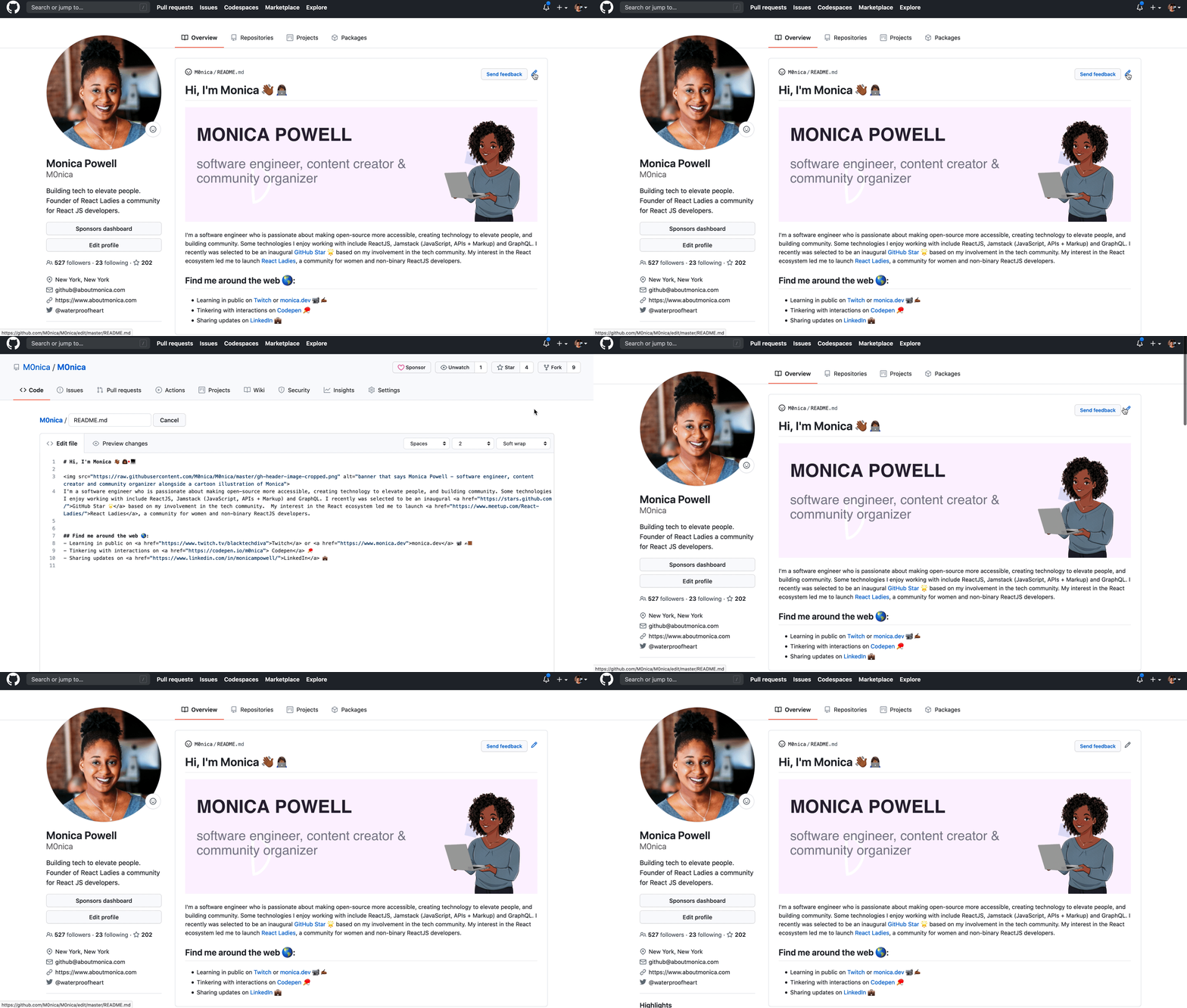 The above GIF shows what my README looks like at the time of this writing. You may notice I was recently selected to be GitHub star!
Why READMEs?
The GitHub profile-level README feature allows more content than the profile bio, supports markdown which means you can play around with the content more visually (Did someone say GIFs!?) and the README is significantly more visible as it is placed above pinned repositories and takes up as much space above the fold of the webpage as you like.
A solid README is a core-component of well-documented software and often encourages collaboration by sharing helpful context with contributors. In my opinion, a profile-level README seems like a great extension of a convention a lot of GitHub users are already familiar with. If you’re looking to make project-level READMEs more awesome and helpful check out matiassingers/awesome-readme for resources and examples of compelling READMEs.
How do I create a profile README?
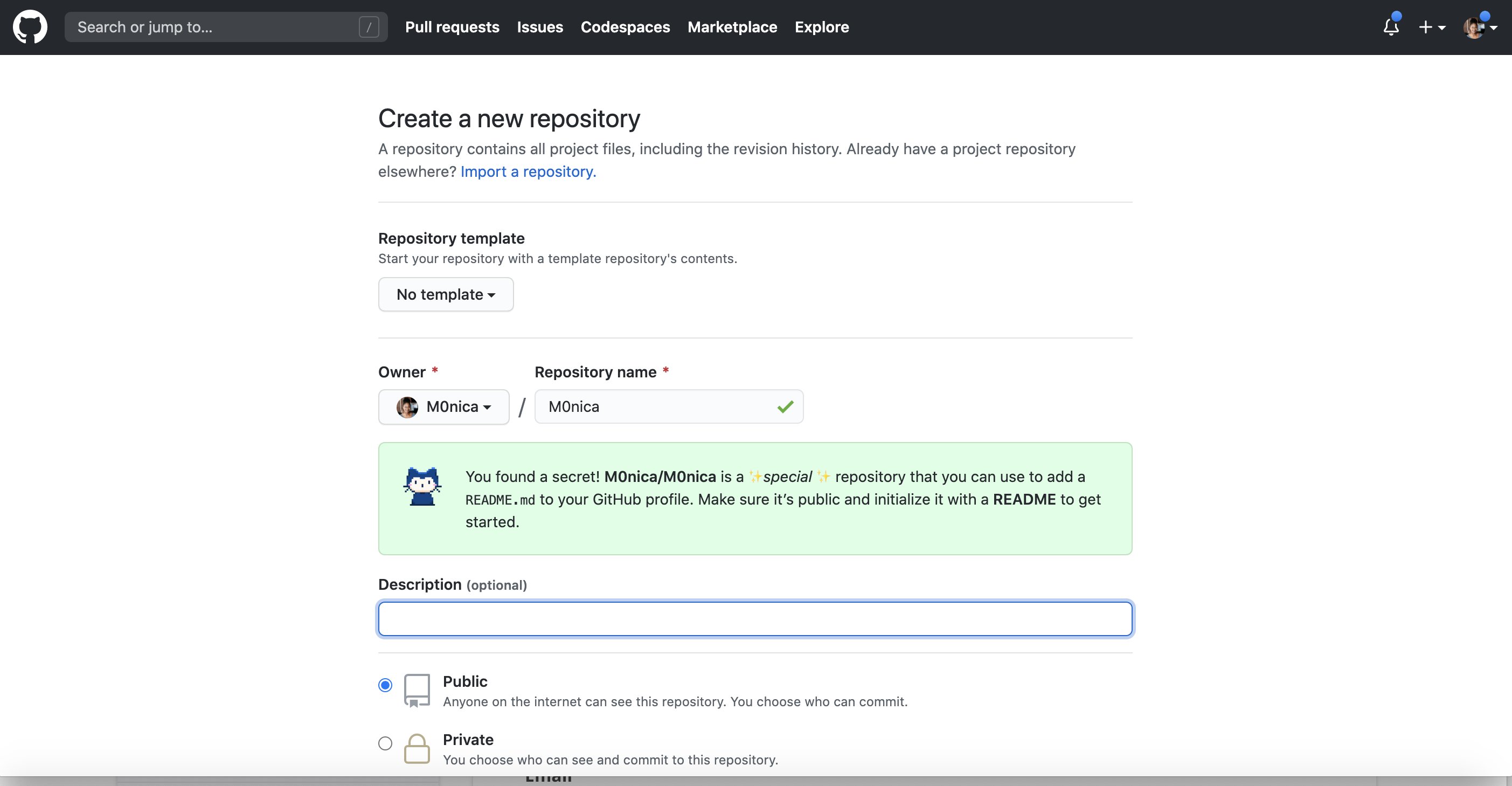
The profile README is created by creating a new repository that’s the same name as your username. For example, my GitHub username is m0nica so I created a new repository with the name m0nica. Note: at the time of this writing, in order to access the profile README feature, the letter-casing must match your GitHub username.
-
Create a new repository with the same name (including casing) as your GitHub username: https://github.com/new
-
Create a README.md file inside the new repo with content (text, GIFs, images, emojis, etc.)
-
Commit your fancy new README!
- If you’re on GitHub’s web interface you can choose to commit directly to the repo’s main branch (i.e.,
masterormain) which will make it immediately visible on your profile)
- If you’re on GitHub’s web interface you can choose to commit directly to the repo’s main branch (i.e.,
-
Push changes to GitHub (if you made changes locally i.e., on your computer and not github.com)
Fun READMEs
The GitHub README profiles are written in Markdown which means you aren’t just limited to texts and links, you can include GIFs and images. Need to brush up on Markdown Syntax? Check out this Markdown Cheatsheet.
hey, check out the new @github profile README! this is a really nice addition — I love that we can add some context (and/or nonsense) to our GitHub profiles now 😍
— Jason Lengstorf (@jlengstorf) July 9, 2020
see mine: https://t.co/Cvrch1DVFD
thanks to @cassidoo for the heads up that this went live! pic.twitter.com/xMTeBgRLh0
It's not as creative as @sudo_overflow's readme, but here's what I came up with. I also plan on adding some text below the image with links to my resume, etc. pic.twitter.com/C6b8tNDo1z
— west, donavon west™️ (@donavon) July 9, 2020
Is this how we suppose use github's readme? pic.twitter.com/XvLvCUC6iD
— Pouya 🌼 daisyUI 5.6 soon (@Saadeghi) July 9, 2020
If you’re really ambitious you can use GitHub actions or other automation like bdougieYO or simonw to dynamically pull data into your README:
Check it out. I made MySpace but on @github.https://t.co/p4DWP4DxRR - My list is power by a GitHub Action workflow 😏 pic.twitter.com/PN80mFCqOE
— bdougie on the internet (@bdougieYO) July 10, 2020
Made myself a self-updating GitHub personal README! It uses a GitHub Action to update itself with my latest GitHub releases, blog entries and TILs https://t.co/Eve7FOrwYK pic.twitter.com/oJPXLtFdgM
— Simon Willison (@simonw) July 10, 2020
Serverless functions can also be used to dynamically generate information (for example your current Spotify activity):
I embedded a @Spotify Now Playing widget in my @github profile README!
— Nate Moore is on 🦋 (@n_moore) July 12, 2020
It's an SVG rendered on the fly via @vercel serverless function, included in the README via <img> tag.
Supremely over-engineered, but I discovered lots of fun hacks in the process.https://t.co/Z8TBE9WxRy pic.twitter.com/wdKw0maPKp
I’m a huge proponent that folks should maintain a website they have complete ownership over (even if it’s a no-code website solution) but this is tempting…
I just created my @github profile README as well with a bunch of badges. This is really a brilliant idea. We may no longer need to maintain our personal website. We can write blogs as issues, manage Wiki and task board, free traffic analytics and CI/CD. https://t.co/zSXZKT6a20 pic.twitter.com/mK9OWXG9iH
— Yuan (Terry) Tang (@TerryTangYuan) July 10, 2020
hey, so we heard ya & are trying out a thing where you CAN have a readme on your @github profile... @mikekavouras built it btw! re: https://t.co/UC6q3qHjjR pic.twitter.com/kB0kafgovY
— kathy (@pifafu) May 27, 2020
I’ve been inspired by the creative READMEs I’ve seen so far and am looking forward to seeing all kinds of profiles in the upcoming months.
 Follow @monica.dev


 What's this?










aboutmonica.com/blog/how-to-cr…
This article walks through how to access this new feature. @waterproofheart also shares some fun GitHub profiles she's seen so far! aboutmonica.com/blog/how-to-cr… #womenwhocode #womenintech #girlswhocode #100daysofcode #codenewbie #womeninstem
Wonderful
Congrats! 🏆 Link to the excellent blogpost: aboutmonica.com/blog/how-to-cr…
in How to Build a Dynamic GitHub Profile with GitHub Actions and PHP | Hacker Noon
D45 #100DaysOfCloud/#100DaysOfCode Dusting off GitHub after 6mnths of almost-silence due to work being 100% Bitbucket. Reminded of how much I ♥︎ it! Esp its new(ish) profile feature - just create a repo w the same name! 🤯 Thnx to @indigitalcolor aboutmonica.com/blog/how-to-cr…
Recommended Read: How To Create A GitHub Profile README aboutmonica.com/blog/how-to-cr… #devopsish
How To Create A GitHub Profile README aboutmonica.com/blog/how-to-cr… via @instapaper
Useful instructions from Monica Powell, aboutmonica.com/blog/how-to-cr…
I just found out that you can create a #README file for your #GitHub profile. 😲 How cool is this?! @waterproofheart put together a list of very funny & creative profile pages. Treat yourself: aboutmonica.com/blog/how-to-cr… 📃✨
How To Create A GitHub Profile README @waterproofheart aboutmonica.com/blog/how-to-cr…
Looking doing this soon aboutmonica.com/blog/how-to-cr…
Two months ago, I came across this article: aboutmonica.com/blog/how-to-cr… @waterproofheart It shows how it's easy and mostly fun to create a GitHub profile! That inspired me to create my own and a specific readme where I listed all my projects with links, descriptions, and more! 👇1/2
in Mirroring my Code to sourcehut
How To Create A GitHub Profile README | monica*dev aboutmonica.com/blog/how-to-cr…
Huge thanks to @waterproofheart for this handy explainer on how to set up a GitHub profile, the perfect little task after a long day (short afternoon, really) of @thecarpentries GitHub class. Check mine out github.com/jessamynwest
Huge thanks to @waterproofheart for this handy explainer on how to set up a GitHub profile, the perfect little task after a long day (short afternoon, really) of @thecarpentries GitHub class. Check mine out github.com/jessamynwest
How To Create A GitHub Profile README aboutmonica.com/blog/how-to-cr…
Thanks to the great write up from @waterproofheart (twitter.com/waterproofhear…), I got an initial profile readme up on @github. github.com/joelmturner
I made the first version of my @github /README.md, more crazy ideas coming. If you want to do yours, @waterproofheart got you covered with aboutmonica.com/blog/how-to-cr…
I will be updating my page using these tips. Thanks so much for this @waterproofheart my GitHub needs all the help it can get, it's a hot mess over there 😃
I added a nice feature to my GitHub profile page. A more prominent section to use for more descriptive stuff to mention. Its a nice thing to have. github.com/cazepeda Credits: aboutmonica.com/blog/how-to-cr…
July 29, 2020 | No Comments Monica Powell shared a really cool trick the other day: The profile README is created by creating a new repository that’s the same name as your username. For example, my GitHub username is m0nica so I created a new repository with t... Read more
in How to nail the job interview?
How To Create A #GitHub Profile README : aboutmonica.com/blog/how-to-cr…
#100DaysOfCode day 99 - learned how to setup a Github profile README. If you haven't, swing by @waterproofheart for an excellent primer. Here's the article @JeromeHardaway shared. aboutmonica.com/blog/how-to-cr… Now to clean that thing up... #CodeNewbie #GetAfterIt #BetterTogether
Yesterday I wrote my @github personal README ✨ @waterproofheart has a great overview of how you can do it yourself and what people have been coming up with! aboutmonica.com/blog/how-to-cr… Check it out: github.com/pgaspar
Github profile README is awesome. Go check it out. Here's a nice blog about it @waterproofheart aboutmonica.com/blog/how-to-cr…
Nice! aboutmonica.com/blog/how-to-cr…
I know what I will be doing => aboutmonica.com/blog/how-to-cr…
This is such a good idea, @github profile readme's! aboutmonica.com/blog/how-to-cr… Check out mine! github.com/jesse1981
aboutmonica.com/blog/how-to-cr…
So cool! I remember all the creativity with MySpace, members learning HTML for the first time! Can we also resurrect some sort of LinkExchange? Idea: randomly jump through a curated lists of GitHub profiles (or randomly pick from faves) via a link you embed on your page.
Cómo crear el readme de la página de perfil de GitHub aboutmonica.com/blog/how-to-cr… vía @waterproofheart
How To Create A GitHub Profile README | monica*dev aboutmonica.com/blog/how-to-cr…
Your reminder (and mine) to go and update your README. aboutmonica.com/blog/how-to-cr… @waterproofheart
A fun way to personalize your Github profiles. Check out Monica's tutorial! Thanks @waterproofheart aboutmonica.com/blog/how-to-cr…
aboutmonica.com/blog/how-to-cr…
Thank you @waterproofheart aboutmonica.com/blog/how-to-cr…
I checked it out through @EmmaBostian tweets it is wonderful and helpful for building my github profile thanks to @waterproofheart for you article and @EmmaBostian for sharing with us😊 aboutmonica.com/blog/how-to-cr…
Create your own github profile aboutmonica.com/blog/how-to-cr…
Expect more creativity! 🎨🖼
The readme of @sindresorhus is still 10/10. 👌
I did embed some illustrations yesterday but these give me more ideas. Thanks :D
Who wants to be in my GitHub top 8?
I loved her @waterproofheart article. I took inspiration from it and followed the instructions to create my profile :) twitter.com/j_brgnz/status…
Perfect Friday type of work 😃
Finally updated my GitHub profile! Thanks @waterproofheart for your article on creating a README! :) aboutmonica.com/blog/how-to-cr…
aboutmonica.com/blog/how-to-cr…
機能の追加いつくるんだろうーとボケーとしてたら普通に作れるんやねこれ aboutmonica.com/blog/how-to-cr…
Create your GitHub profile README 😊 aboutmonica.com/blog/how-to-cr…
Article by @waterproofheart Article link : aboutmonica.com/blog/how-to-cr…
in The GitHub Profile Trick
GitHub profile readmes are about to be the Myspace for developers! How cool are some of these ideas: intro gifs, live-updating data, showing the currently playing song, etc. etc. etc. aboutmonica.com/blog/how-to-cr… 🤯
How To Create A GitHub Profile README - Monica Powell aboutmonica.com/blog/how-to-cr…
Sooo, I just heard #Github has a fun new feature: aboutmonica.com/blog/how-to-cr…
Pretty profiles: aboutmonica.com/blog/how-to-cr…
You can now add a README to your GitHub profile, making it even easier to promote yourself. @waterproofheart shows you how easy it is: aboutmonica.com/blog/how-to-cr…
Coolest thing on github to date aboutmonica.com/blog/how-to-cr…
@github recently released a feature that allows users to create a profile-level README to display prominently on their GitHub profile. @waterproofheart walks through how to access this new feature. aboutmonica.com/blog/how-to-cr… #womenwhocode #womenintech #girlswhocode #100daysofcode
aboutmonica.com/blog/how-to-cr…
aboutmonica.com/blog/how-to-cr…
How To Create A @github Profile README aboutmonica.com/blog/how-to-cr… by @waterproofheart #github #frontend #javascript
"How To Create A GitHub Profile README" ... aboutmonica.com/blog/how-to-cr…
How To Create a GitHub Profile README: aboutmonica.com/blog/how-to-cr…
Great read 🤗💗 @waterproofheart #github #CodeNewbie aboutmonica.com/blog/how-to-cr…
in Using GitHub’s New “Secret” Profile README Feature
These GitHub README files are pretty slick. I just got rid of my old website since I think this is a good replacement. Thanks for the inspiration @waterproofheart! https://t.co/rYDpW3xPa4
How To Create A GitHub Profile README. Learn how to access GitHub's new profile level README feature. #developer #github #GitHubREADME #developers aboutmonica.com/blog/how-to-cr…
How To Create A GitHub Profile README aboutmonica.com/blog/how-to-cr…
in Technical tips for Software Testers
How To Create A GitHub Profile README aboutmonica.com/blog/how-to-cr… #softwaredevelopment #github #opensource
I love the Githubs aboutmonica.com/blog/how-to-cr…
How To Create A GitHub Profile README aboutmonica.com/blog/how-to-cr…
🔗 How To Create A GitHub Profile README aboutmonica.com/blog/how-to-cr… #github
👉🏻 “How To Create A GitHub Profile README” 🔗 aboutmonica.com/blog/how-to-cr… by @waterproofheart - who does a lot of cool things!
Here is mine fam ! thanks @waterproofheart for the share
Cool, cool, thanks for the tip https://t.co/U8fNGwOEIO
Really neat little secret to spice up your Github page, thanks for the excellent example and pointers @waterproofheart
I just saw this today, and I made my own. Look! github.com/pvinis
How To Create A GitHub Profile README | monica*dev aboutmonica.com/blog/how-to-cr…
I loved it! Tks for sharing!! 😊 github.com/darkaxl
Like the idea
Create A GitHub Profile README aboutmonica.com/blog/how-to-cr…
I love it so I created my README profile as per my professional way👨💻😉 #DataScience #DeepLearning Checkout:- github.com/balavenkatesh3…
Love this
Super cool new feature from @github! Thanks @waterproofheart for the share.
Somebody shared this on @operation_code and I immediately had to go try it out for myself. Just a couple of little edits left and it will be done!
The 2000s called. They want their glitter images back. (seriously though, GitHub READMEs are pretty neat - thank you Monica for taking the time to write this! ❤️) https://t.co/hIoBsUd4R8
Saving! I need to do this. 😂
This is really cool, thank you for sharing!
Woah, that’s cool!
How To Create A GitHub Profile README aboutmonica.com/blog/how-to-cr…
👏👏👏
How To Create A GitHub Profile README - DEV Community 👩💻👨💻 aboutmonica.com/blog/how-to-cr…
@akiolisa
aboutmonica.com/blog/how-to-cr…
👏🏿👏🏿👏🏿👏🏿👏🏿
Thanks! I'm all set up now. github.com/AdamSHurwitz
This is like MySpace all over again! I just published mine at github.com/jesalg Thanks for introducing me to it @waterproofheart Now only if it had support for blink & marquee text ✨ https://t.co/LSwQfYHDlh
@GitHub Profile README - the new @LinkedIn profile of #geeks, #nerds and #programmers. The #NewNormal aboutmonica.com/blog/how-to-cr…
This is fantastic!
This is awesome! I was experimenting with event-driven changes to your profile (on new event, update README) using @pipedream and wrote up how to update my profile on new DEV posts : dev.to/dylburger/show… . Added a shout out to your profile in there, love the design ♥️
Looks like the mobile app still has no support for profile readmes?
How To Create A GitHub Profile README aboutmonica.com/blog/how-to-cr…
@kirubaspace
This is awesome!!! We play Chess on mine. Want to take the next move? github.com/timburgan
Nice!
Looks good, I think I will try that.
This is all sorts of amazing!
After reading an excellent article by @waterproofheart I’ve updated my GitHub profile page at github.com/bravelocation to look a whole lot nicer 👍 The article is at aboutmonica.com/blog/how-to-cr… if you want to do the same
Thanks, it's clear and useful!
So happy I learned about this github.com/Gielpy
Great profile! How did you create a brown skin tone :wave: emoji? I've been struggling to do this for a while.
This is awesome!
🔥 🔥
sweet!
How to use ful profile madam
Please anyone guide me how to get Github.io.domain because i tried everything but it didn't work. bdxoul.guthub.io
Nicely done
aboutmonica.com/blog/how-to-cr…
How To Create A GitHub Profile README by @waterproofheart aboutmonica.com/blog/how-to-cr…
This is amazing!
This is cool. I look forward to trying it out. Thanks for a great article.
💙love technology
Very neat trick, and super quick & easy to do!
This is sick! Thank you!
Made a fancy Github profile readme as per this guide: aboutmonica.com/blog/how-to-cr… ...It's basically a copy & paste of my LinkedIn but with some emojis & photos. I guess that's enough? 😅😁 Check out the profile here: github.com/AlexHolderDeve… #github #developer
This is going on my to do list.
Super cool! #DataScience
Thank you so much for sharing. It really is appreciated.
Omgggg this is so helpful!! Thanks!!
This is awesome
Oh that's how you do that! https://t.co/dh6O2QY7kt
Wonderful. Thank you
@OdsRaquel
Thank you so much for this post! I updated my own "Readme"
How To Create A GitHub Profile README | monica*dev aboutmonica.com/blog/how-to-cr…
This was pretty Good! 😃#resume #100DaysOfCode #github
Thnxs @waterproofheart. It was very interesting, cause I am looking for a good or inspiring idea on how to organize that page. I suggest you make another article again after a while when everybody will try this feature out. I think at that time you will find even better examples
Did. Not. Know. This.
Thanks!
Cool 😎 thanks
Brilliant achievement. Pl share a copy ...@mosharrafzaidi
Thanks.......
I didn't know of this feature! I'll add a GitHub readme with a big link to my GitLab profile 🙃
@okekehi
🥰
👏👏👏
I need to get going on this!
Just use pure html when you need it, for example resizing an image 😂😂
github.com/dustinrouillard *
This is so cool! Thank you
Woah, thanks! I totally missed this was possible
Esto mola bastante. Estoy deseando de ver el de mis jefes del curro 😁😅
Thank you, I was looking for (official) instructions and they're nowhere to be found!
😍
github.com/dustinroulliard updated his automatically based off wakatime. Pretty neat. I'm finishing mine to be a little bit more outlandish though.
You're a pro in mark-down files. I stan
Thanks. I'll take the read. I just might end up stealing code from yours though 🤣🤣🤣
I like this! It's really simple.
Keep it like that, it's something different (maybe not after you shared it here) and I like it
I know you’ll put a nice spin on yours. I always enjoy reading your copy and seeing the designs you come up with like your Twitch frames.
...and it's done! I might add more to it. I've borrowed some features from other responses to your tweet - such as the badges, and your image idea of course! github.com/sam-cross
You can also be a pro with markdown! guides.github.com/pdfs/markdown-…
Cool! Thanks for sharing . I’m excited to try this out.
Saving this for next week as I update mine 🙂
It looks amazing
This looks awesome, I'm working on this right now
Thank you 💕
😍
part of what makes learning in public and creating content fun is being able to express your personality as part of it i love that @github added this feature and it’s really cool to see what kind of creative things people are doing with their profile
Thanks for the inspiration! I just published mine: https://t.co/w6hLH8hZuw
Thanks!
I had to update mine after I saw people were using images 😂
I can't believe people are using 1̶0̶m̶b̶ ̶G̶I̶F̶s̶ videos, I don't think I can top that!
💯 thank you!
The .new TLD is very handy!
News I can use 👍
Nice! thanks, btw you can go to useful shortcut repo.new 😁